Pinterest Keyword Finder & Research Tool For Marketer
Search, compare, and track pins, boards, and profiles — spot trending content and competitors — all as a Chrome extension, right inside your browser.
✓ Free plan available ● 5 searches/day free ● 10/day after signing in ● 5 licenses per Pro plan ● 7-day refund
13+
Powerful Tools
5/day
free 10/day after sign-in
3M+
Pins Analyzed
All Tools
Thirteen tools. One extension.
Everything a Pinterest marketer needs — from finding the right keywords for Pinterest to board discovery, competitor tracking, and side-by-side comparisons — in a single Chrome extension. Free plan includes 5 uses per day on every tool, or 10 once you sign in — same limits on the web app and the Chrome extension.
Boards
Search any keyword and get boards sorted by Profile Reach, Owner Followers, Pin Count, or Last Modified — full engagement metrics, bulk copy, and CSV export.
Search
Run a Pinterest keyword search across pins — filter by keyword and sort by Engagement, Saves, Repins, Comments, Reactions, Shares, or Created date. Full metrics and dominant color, exportable to CSV.
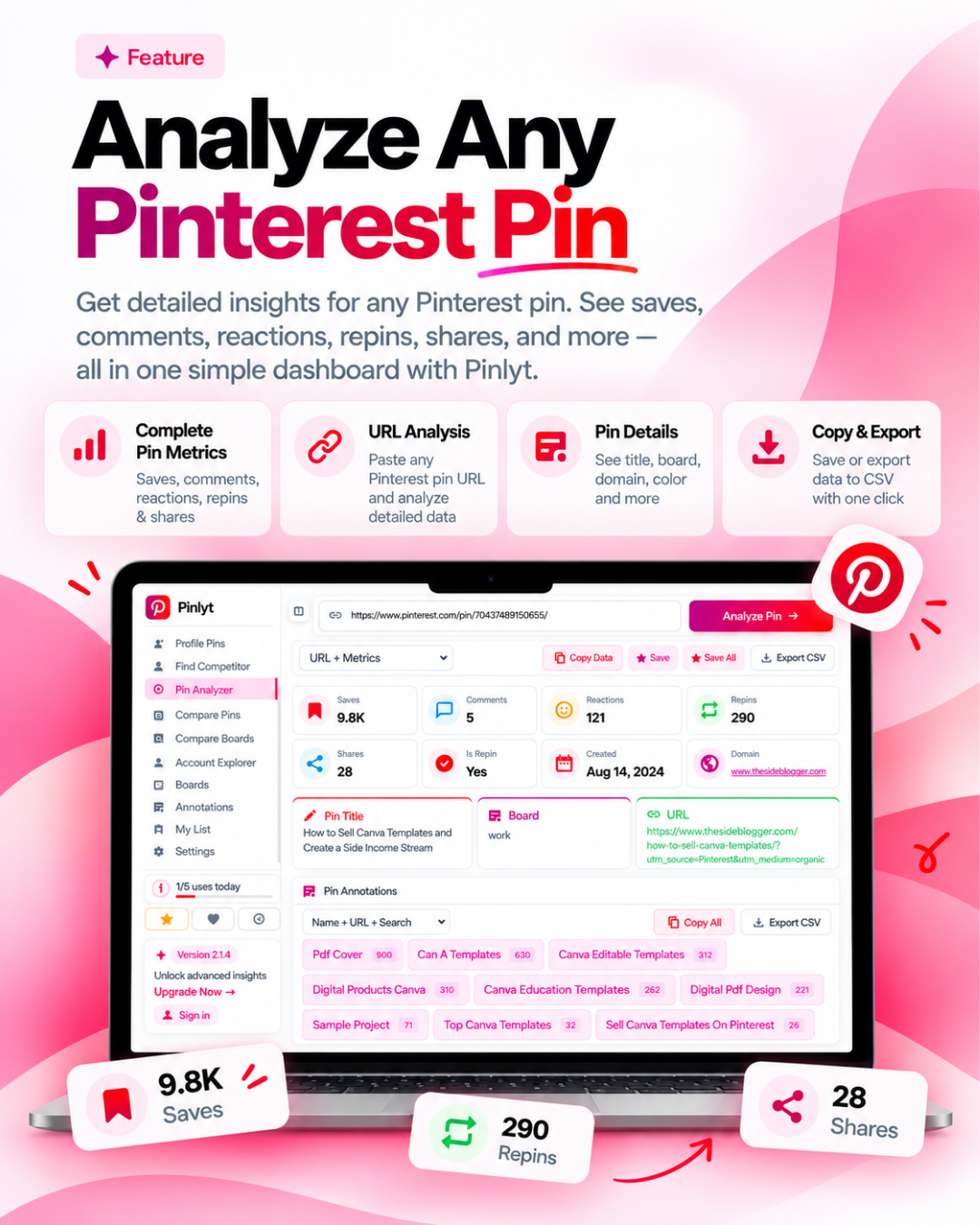
Pin Analyzer
Paste any pin URL to reveal saves, comments, reactions, repins, shares, repin status, creation date, dominant color, title, and destination URL — all in one view.
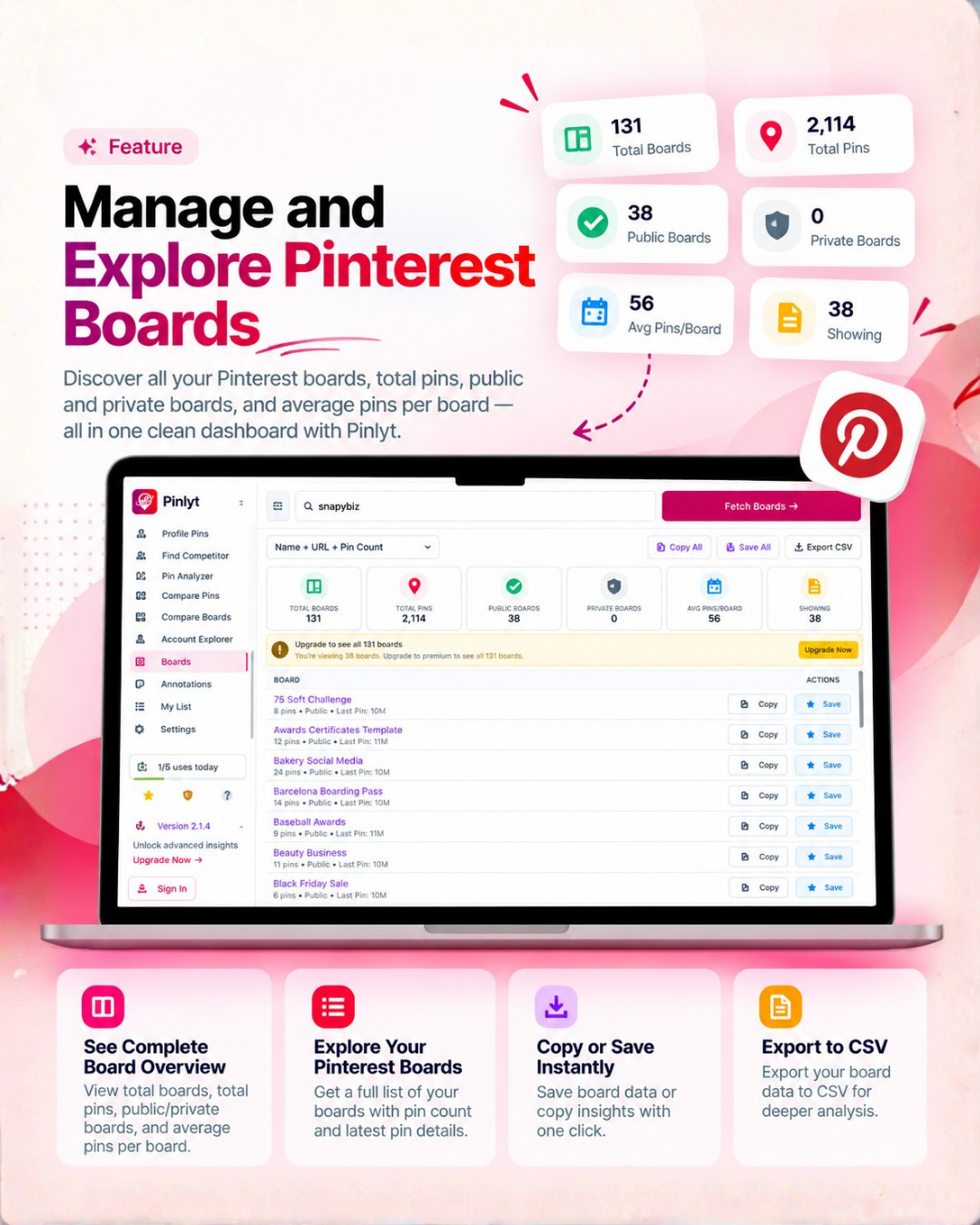
Boards Overview
Enter any username to see boards, pins, followers, profile reach, profile views, verified status, and more — a full Pinterest account analyzer in one screen.
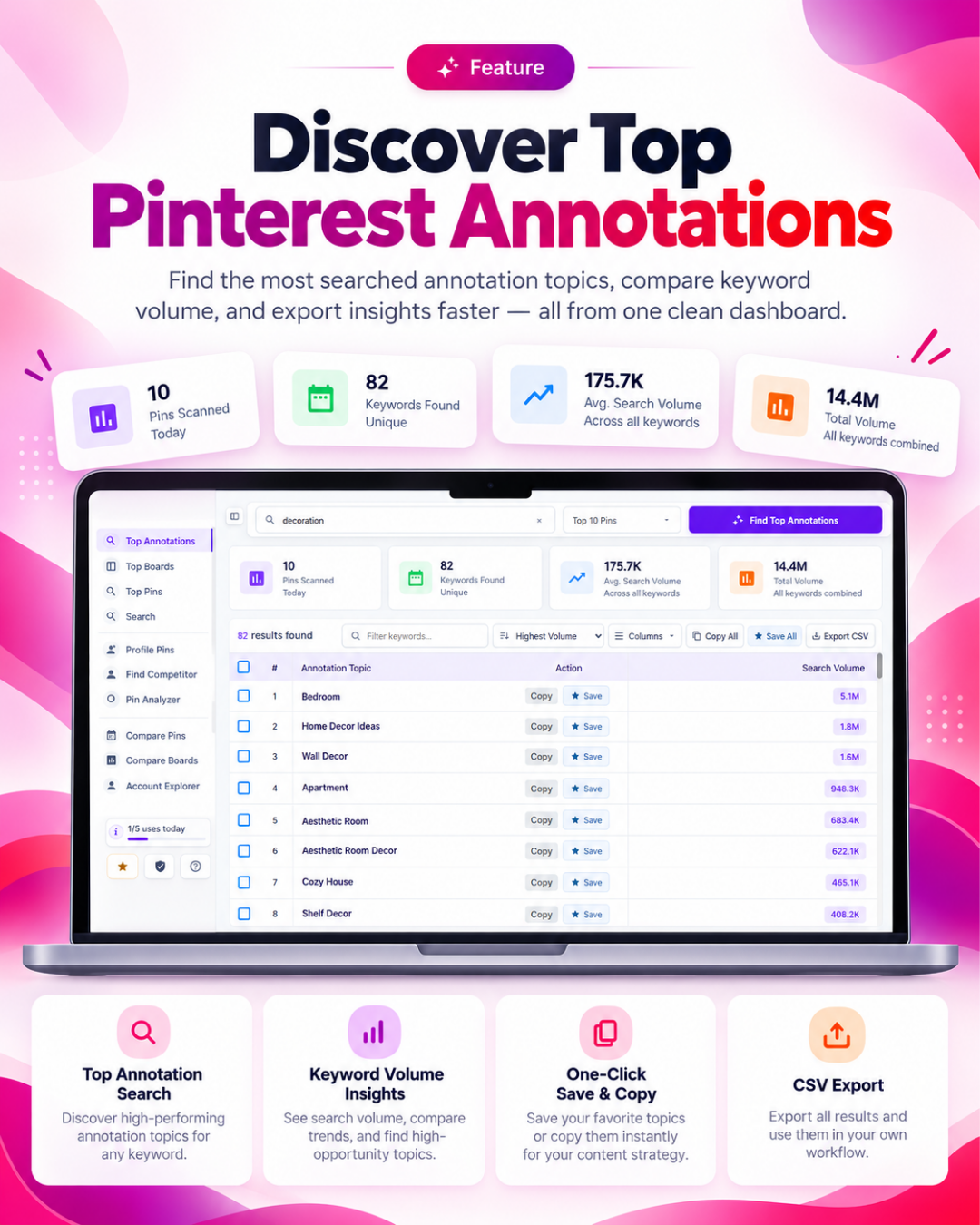
Top Annotations
See the most common, highest-volume keyword tags Pinterest uses for any niche — the closest thing to a dedicated Pinterest search volume tool for spotting what to target next.
Annotations
Paste any pin URL to fetch the keyword annotations Pinterest has assigned to it — a built-in Pinterest keyword tool with Pinterest keyword search volume for each tag. See exactly how Pinterest categorizes and distributes a pin.
Profile Pins
Enter any username to pull every pin from that account, sortable and exportable — study a creator's or competitor's full pin history at a glance.
Find Competitor
Discover the Pinterest accounts competing for your keywords and niche, so you always know who else is winning the boards you care about.
Compare Pins
Put two or more pins side by side — up to 4 at once — and see exactly which one is winning on saves, engagement, and reach.
Compare Boards
Compare two or more boards side by side — up to 4 at once — reach, followers, pin count, and activity — to benchmark against competitors.
Top Pins
See the best-performing pins for any keyword or niche, ranked by saves and engagement — built for trend and content research.
Top Boards
See the top-ranking boards for any keyword or niche, so you know exactly which boards to target or model.
Pin Stats Overlay
Live saves, repins, reactions, shares, and age appear directly on every pin as you browse Pinterest — no separate screen, just an overlay that follows you around the site. Toggle on/off, choose Small, Medium, or Large.
My List
My List lets users save, organize, and quickly access selected items in one place. It works like a personal shortlist, making it easy to keep track of important pins, ideas, or content without searching for them again.
Pin Analyzer
Every pin metric that matters.
Paste any pin URL and Pinlyt instantly reveals the data Pinterest doesn’t show you — saves, repins, comments, reactions, shares, is-repin status, creation date, dominant color, pin title, and full destination URL.
★
Saves & Repins Tracking
Track how many people saved or reshared a pin — a direct signal of content-market fit.
★
Associated URL
See the exact URL linked to any pin — ideal for tracking where traffic is being driven and researching competitor destinations.
★
Creation Date & Repin Status
Know exactly when a pin was created and whether it's original or a repin — crucial for trend timing.
★
Export & Copy Data
Copy metrics to clipboard or export CSV — ready to paste into your reporting spreadsheet.
Boards Overview
Unlock every Pinterest account.
Enter any Pinterest username to fetch their full profile — boards, pins, followers, reach, and activity. Free plan shows a 30% preview. Pro unlocks everything.
★
Bulk Copy & CSV Export
Export board name, URL, and pin count in one click — paste straight into your sheets or reports.
★
Public vs. Private Detection
Instantly see which boards are public or private — useful for auditing your own account or a competitor's.
★
Last Pinned Activity
See how recently each board was updated — identify active vs. dormant boards at a glance.
★
Account-Level Summary
See total boards, total pins, public vs. private count, and average pins per board — all before you drill into individual boards.
Top Annotations
Find the Pinterest insights that matter most.
Pinlyt’s Top Annotations help you keep track of the most important findings from your Pinterest research. Whether you are analyzing pins, boards, keywords, or competitor profiles, you can save key observations, SEO notes, and content ideas in one organized place.
★
Keyword Notes
Spot important Pinterest keywords, trending terms, and SEO ideas inside pin and board content.
★
Content Signals
Identify strong titles, descriptions, hashtags, and visual patterns that help pins perform better.
★
Competitor Clues
Save useful insights from competitor pins, boards, and profiles for faster research.
★
Action Reminders
Turn observations into simple next steps for improving Pinterest traffic and visibility.
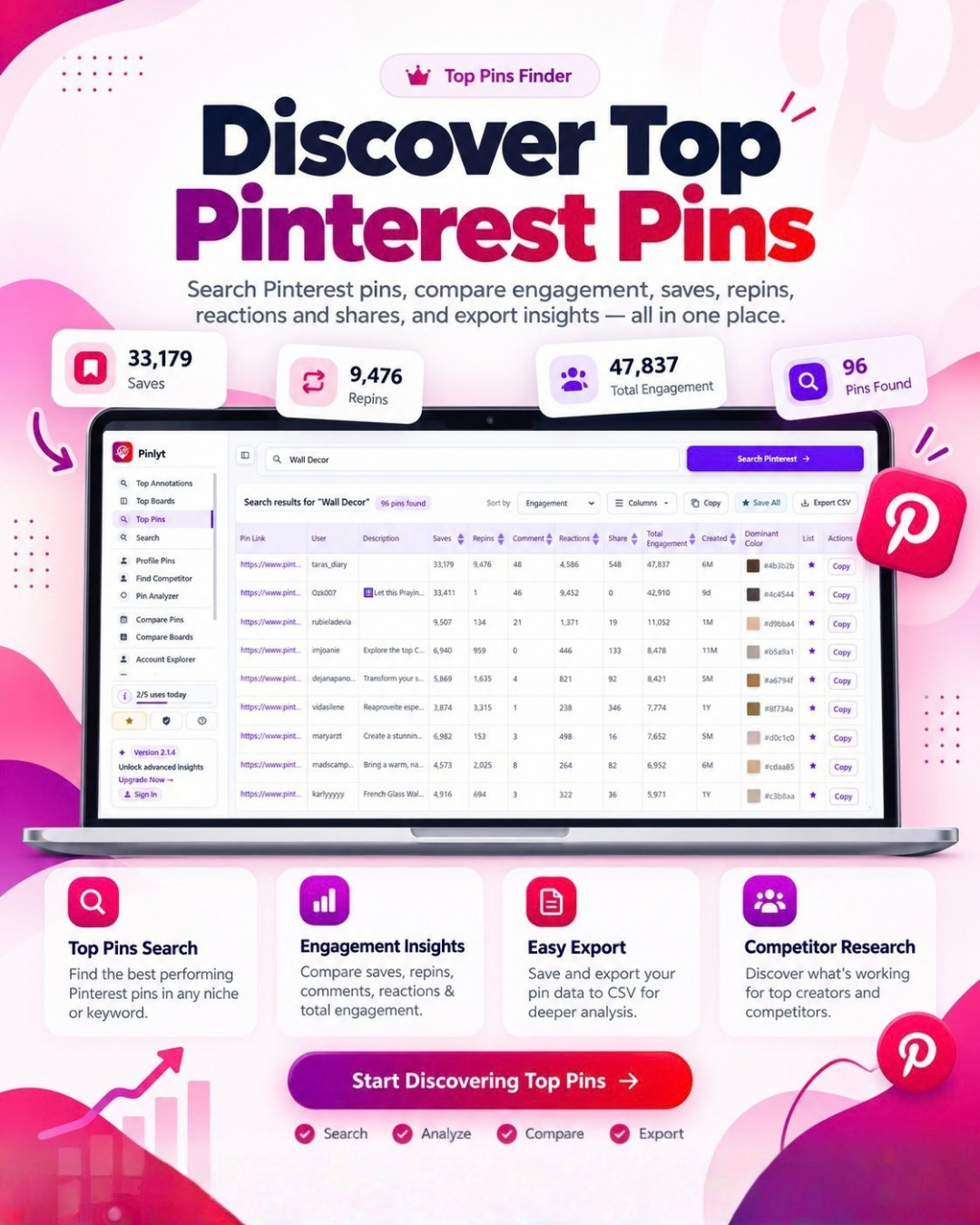
Top Pins
Discover pins that drive engagement.
Pinlyt helps you discover and analyze top-performing pins across your niche, competitors, and saved research. See which pins are getting attention, what keywords they use, and what content patterns you can apply to your own Pinterest strategy.
★
Analyze Winning Pins
Review high-performing pins to understand their titles, descriptions, visuals, keywords, and engagement signals.
★
Discover Content Trends
Spot trending pin topics, formats, and creative angles that are gaining traction on Pinterest.
★
Compare Pin Performance
See how different pins perform across saves, clicks, impressions, and keyword relevance.
★
Improve Future Pins
Use insights from top pins to create stronger titles, descriptions, designs, and Pinterest SEO strategies.
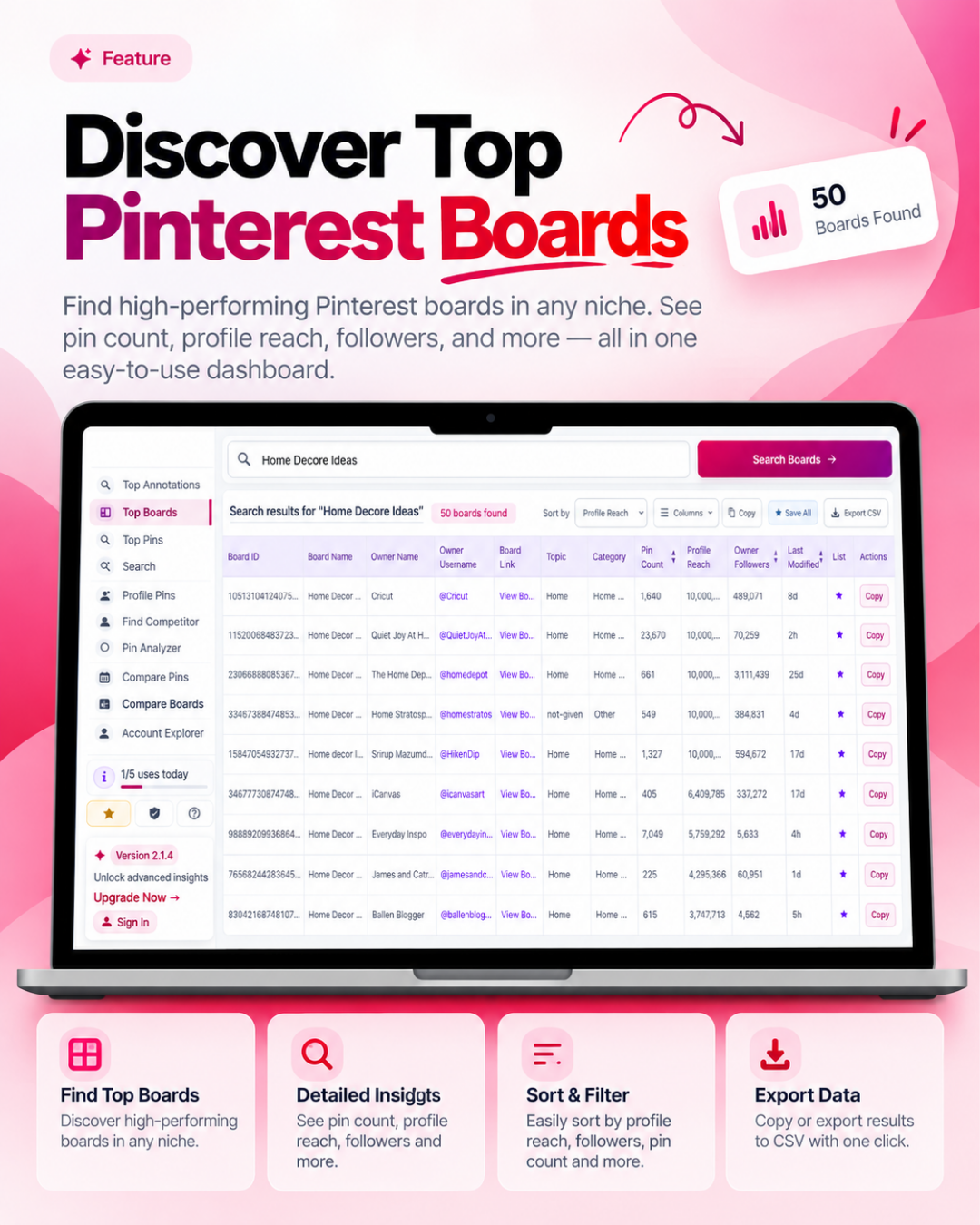
TOP BOARDS
Study the boards shaping your niche.
Pinlyt gives you a clearer view of the Pinterest boards that are performing well in your market. Analyze board names, descriptions, keyword targeting, content quality, and competitor board strategies to improve your own Pinterest presence.
★
Research Keyword-Rich Boards
Find boards using strong Pinterest keywords in their titles, descriptions, and content themes.
★
Analyze Board Strategy
Understand how successful boards are structured, what topics they cover, and how often they publish.
★
Track Competitor Boards
Review competitor boards to identify niche opportunities, content gaps, and ranking patterns.
★
Optimize Your Boards
Use board insights to improve your board titles, descriptions, categories, and pin organization.
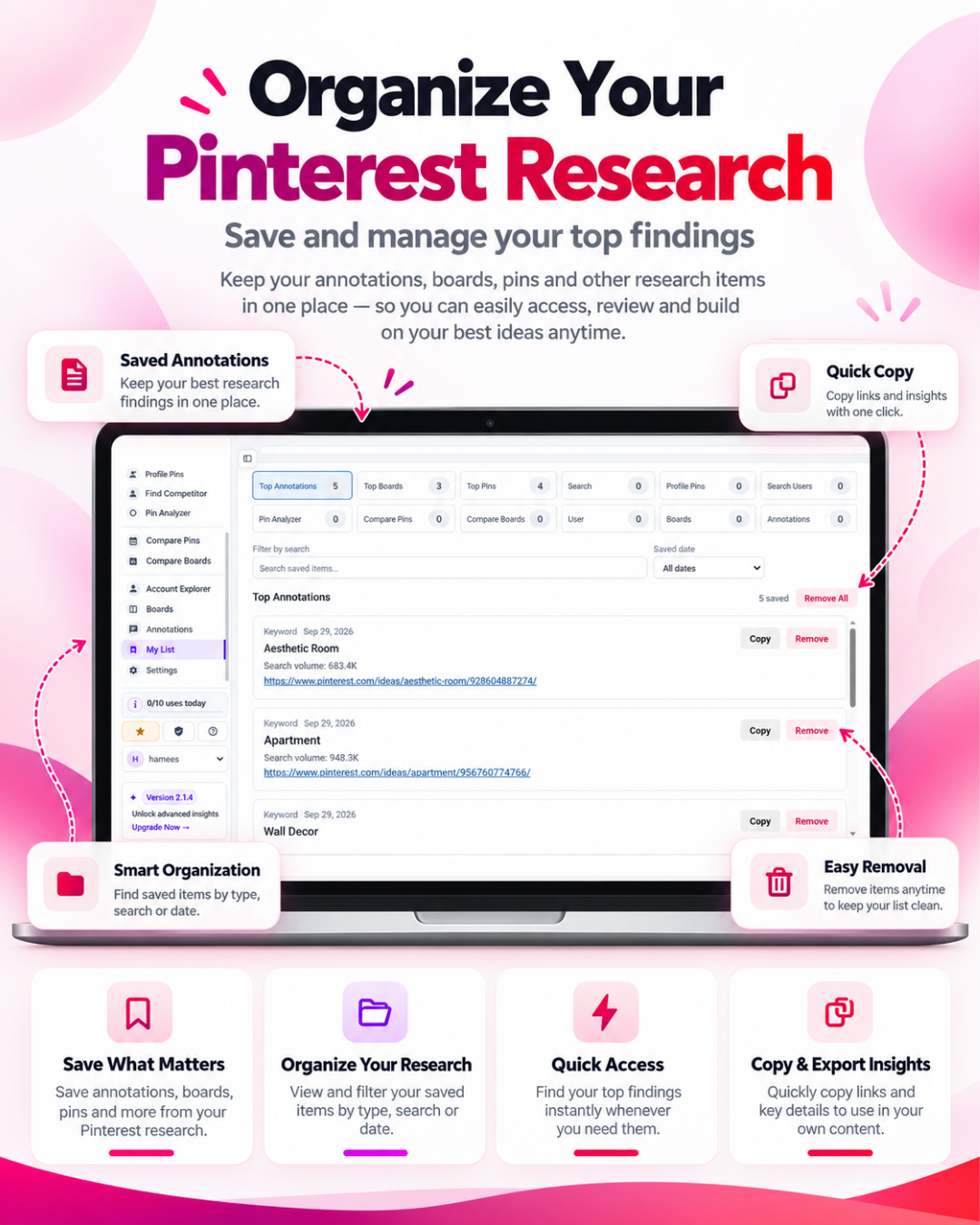
MY LIST
Keep your Pinterest research organized.
My List is your personal workspace inside Pinlyt for saving pins, boards, keywords, annotations, and competitor ideas. Instead of losing research across tabs and screenshots, you can collect everything in one place and turn it into a clear Pinterest growth plan.
★
Save Pins, Boards & Keywords
Collect useful pins, boards, profiles, and keyword ideas while researching Pinterest trends.
★
Organize Research by Project
Group saved items by niche, campaign, client, competitor, or content strategy.
★
Build Content Ideas Faster
Use your saved research to plan new pins, board updates, SEO keywords, and campaign topics.
★
Export & Reuse Insights
Turn saved lists into repeatable workflows for Pinterest keyword research, content planning, and performance tracking.
Free Plan
Start free.
Start free — no credit card needed. All 13 tools included on the free plan with 5 uses per day each.
Free Plan · Always Free
$00
no credit card required
- 5 uses/day free, 10/day once you sign in — same on web app and extension
- Search, Boards, Pin Analyzer & Annotations
- Account Explorer, Profile Pins & Find Competitor
- Compare Pins & Compare Boards
- Top Pins, Top Boards & Top Annotations
Simple Pricing
Scale when ready.
Pro and Lifetime plans include 5 licenses — one per Chrome profile.
Monthly Pro · Chrome Extension
$6.99
per month · cancel anytime
- Unlimited uses/day on all 13 tools
- 5 licenses — 1 per Chrome profile
- Full Pin Analyzer — all 10 fields
- Full Account Explorer — every metric (swap in the real count if you're keeping a number, e.g. "14 metrics")
- Full board access + CSV export
- Annotation analysis with search volumes
- Compare & Top tools, competitor tracking included
- Priority / Lifetime priority support
Yearly Pro · Chrome Extension
$32
per year · $3.50/mo · save 50%
- Unlimited uses/day on all tools
- 5 licenses — 1 per Chrome profile
- Full Pin Analyzer — all 10 fields
- Full User Analytics — 13 metrics
- Full board access + CSV export
- Annotation analysis with search volumes
- 50% savings vs monthly
- Priority email support
Most Popular
Lifetime Access · Chrome Extension
$37
one-time · pay once, own forever
- Unlimited uses/day on all tools
- 5 licenses — 1 per Chrome profile
- Full Pin Analyzer — all 10 fields
- Full User Analytics — 13 metrics
- Full board access + CSV export
- Annotation analysis with search volumes
- All future updates included
- Lifetime priority support
Instant license activation
5 licenses per Pro plan
7-day refund guarantee
Secure checkout
Every Pro & Lifetime plan includes 5 licenses
Each license activates Pinlyt Pro on one Chrome profile. Use all 5 yourself across different devices or profiles — or share with your team.
Contact Us

Get in Touch
Have questions about Pinlyt? We’d love to hear from you. Send us a message and we’ll respond as soon as possible.
Follow US:


How Can We Help?
Whether you need help with Pinlyt, have a technical issue, or want to share feedback, feel free to reach out. Our team is here to help.
Email Us
What can you contact us about?
- General questions about Pinlyt
- Technical support and bug reports
- Account and billing questions
- Feature requests and feedback
Common questions
What browsers does Pinlyt support?
Pinlyt is currently available as a Chrome Extension, fully compatible with Google Chrome and all Chromium-based browsers such as Microsoft Edge and Brave. Support for additional browsers is planned for the future.How many searches do I get on the free plan?
The free plan gives you 5 uses per day across all 13 Pinlyt tools, or 10 uses per day once you sign in — the same limit applies on the web app and the Chrome extension. Upgrading to any Pro plan removes this limit completely and gives you unlimited searches and full analytics.
Why do I only see 30% of boards on the free plan?
Free users see a 30% preview of any account’s boards — enough to get a feel for the tool. Pro users get full access to all boards, along with complete CSV export and copy functionality.
What's included in Lifetime Access?
Lifetime Access is a one-time $37 payment that gives you full Pro access to every current and future Pinlyt feature — forever. No subscriptions, no renewals, no hidden fees.
Does Pinlyt require a Pinterest account?
No Pinterest account is required for most features. However, some tools work best when Pinterest is open in your browser, as the extension reads data directly from the page.
Can I get a refund?
Yes — we offer a 7-day no-questions-asked refund on all paid plans. Just reach out within 7 days of your purchase, and we’ll sort it out straight away.
Can I compare pins and boards side by side?
Yes — Compare Pins and Compare Boards let you put two or more pins, or two or more boards, next to each other and see exactly which one is winning on engagement, saves, and reach.
Ready to master Pinterest analytics?
Join creators and marketers who use Pinlyt to find trending boards, analyze pins, and outpace their competitors — all from Chrome.